IndiaTVDNA SEO Master Pro Complete Guide: Auto Best Setup, Search Console, Schema, Audit, WooCommerce और WordPress SEO
INDIATVDNA SEO MASTER PRO GUIDE
SEO Master Pro को Best तरीके से कैसे Use करें?
यह guide IndiaTVDNA SEO Master Pro के v2.4.0 production toolset को safe workflow में समझाती है—Auto Best Setup, on-page SEO, Search Console, audit, schema, WooCommerce, sitemaps, redirects, Smart Intelligence, migration और recovery तक। Ranking या traffic की कोई guaranteed percentage नहीं होती; result content quality, competition, crawl/indexing और site health पर depend करता है।
इस Guide में क्या सीखेंगे?
Plugin install और first-time setup का safe क्रम।
Auto Best Setup की 7 site profiles और settings apply करने का तरीका।
Post/Page/Product editor में focus keyphrases, title/meta, canonical, robots, schema और social previews।
Google Search Console, URL Inspection, PageSpeed और rank-history data का सही use।
Site Audit, duplicate content, internal/external links और rendered HTML validation।
Schema Studio Pro, WooCommerce Merchant SEO, sitemaps, redirects, 404 और IndexNow।
SEO Intelligence, change history, rollback, migrations, security और large-site production tools।
1IndiaTVDNA SEO Master Pro क्या है?
SEO Master Pro WordPress और WooCommerce के लिए all-in-one SEO toolkit है। यह metadata, analysis, technical SEO, schema, sitemaps, Search Console, redirects, audits और merchant SEO को एक dashboard में organize करता है।
On-page: SEO title/meta, focus keyphrases, canonical, robots, social cards और score breakdown।
Technical: XML sitemaps, robots, 404/redirects, IndexNow, rendered HTML validation और PageSpeed workspace।
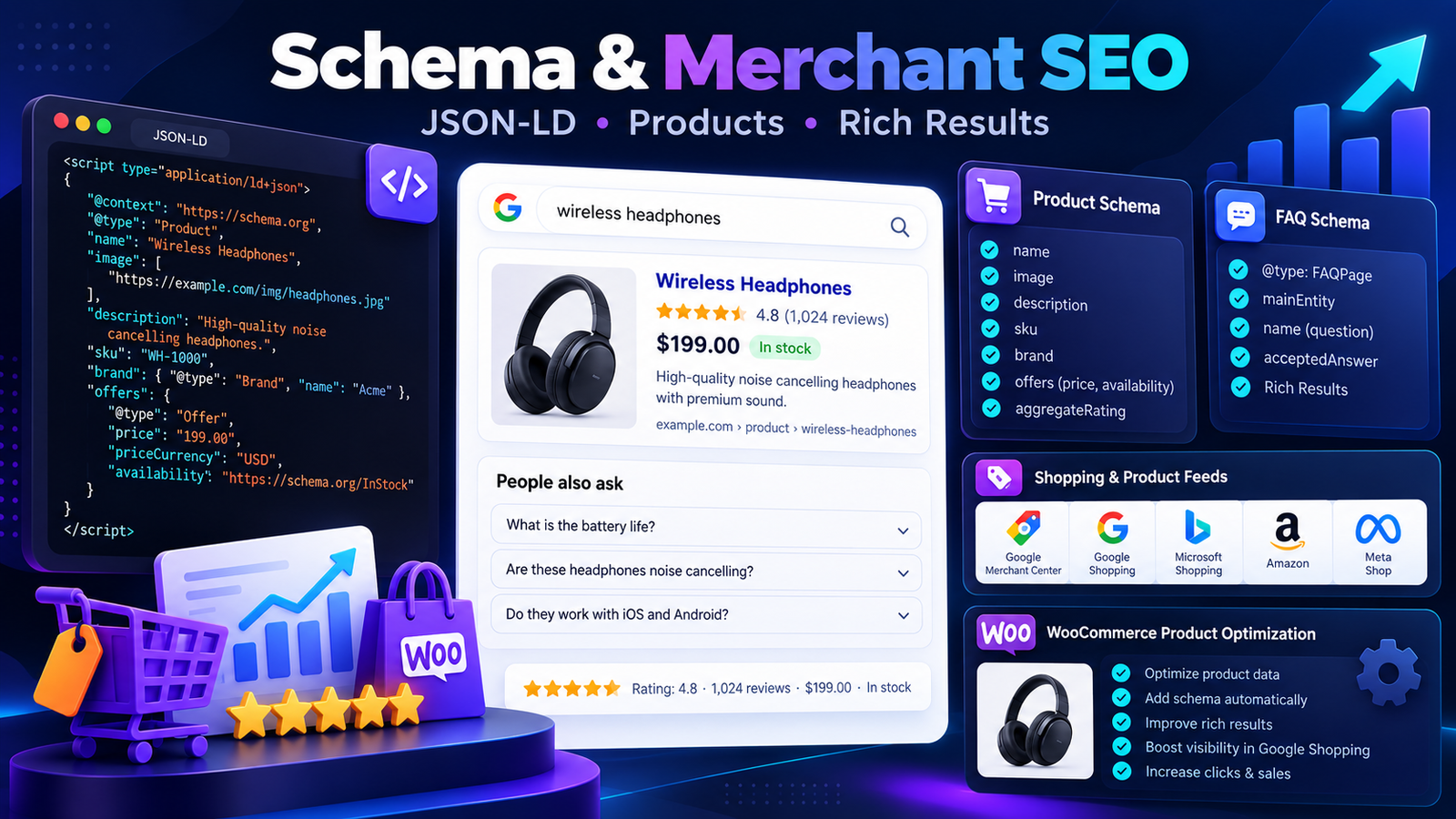
Structured data: Article, NewsArticle, Product, FAQ, HowTo, LocalBusiness, SoftwareApplication और कई schema types।
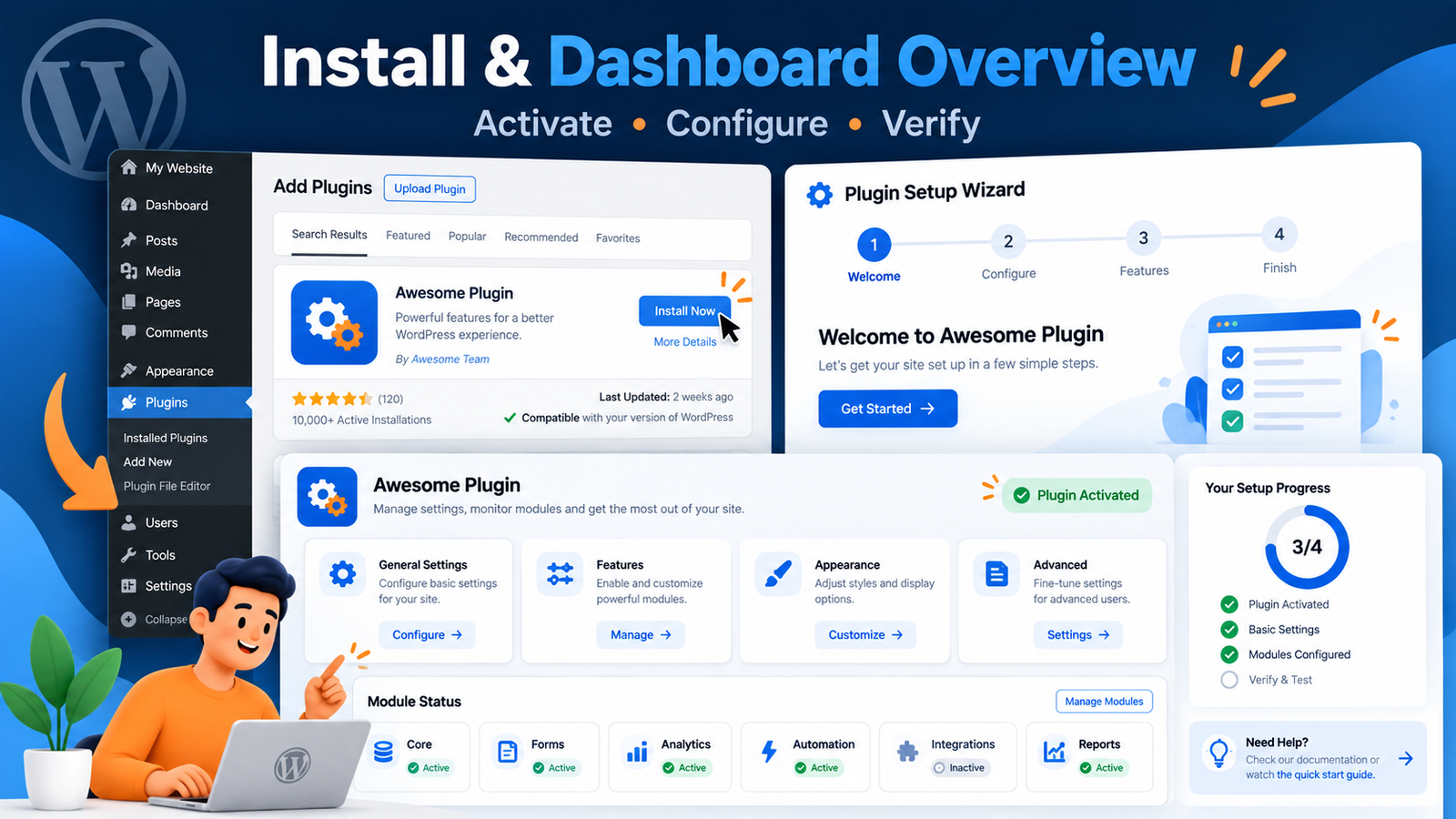
Plugin ZIP को WordPress Dashboard → Plugins → Add Plugin → Upload Plugin से install करें। Activate करने के बाद SEO Master dashboard खोलें और पहले site type / profile review करें।
Install, activate और dashboard overview — पहले safe baseline से setup शुरू करें।
Step 1: ZIP upload करके Activate करें।
Step 2: Dashboard health/status और detected environment देखें।
Step 3: Auto Best/Production Setup चलाने से पहले current settings का snapshot/backup रखें।
Step 4: Apply के बाद frontend title/meta/canonical/schema और sitemap URLs verify करें।
3Auto Best Setup और 7 Site Profiles
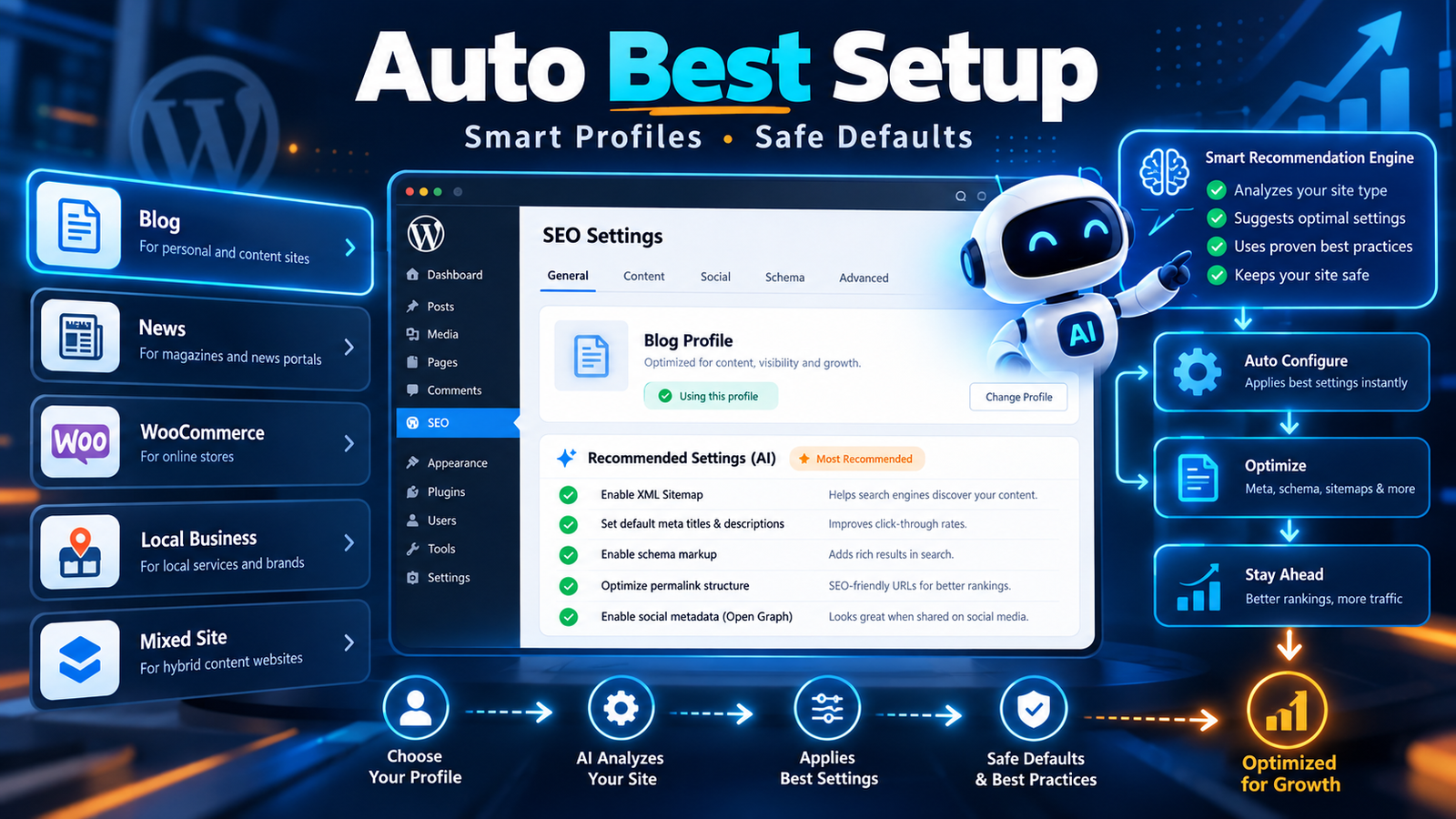
Production Center site type detect करके profile-based baseline settings recommend/apply कर सकता है। Available profiles में Article/Blog, News/Magazine, WooCommerce Store, Software/Digital Store, Local Business, Corporate/Service और Mixed Content + Store शामिल हैं।
Auto Best Setup site type detect करके suitable baseline settings apply करने में मदद करता है; apply करने से पहले profile review करें।
Auto Detect: site content/plugins/context देखकर suitable profile choose करने में मदद करता है।
Review First: automatic profile को blindly apply न करें; site type और business model confirm करें।
Snapshot/Rollback: setup tools pre-run settings snapshot create कर सकते हैं ताकि जरूरत पर rollback हो सके।
Apply Then Verify: sitemap, robots, schema, metadata और frontend output का post-run check करें।
4On-Page SEO Editor और Live Analysis
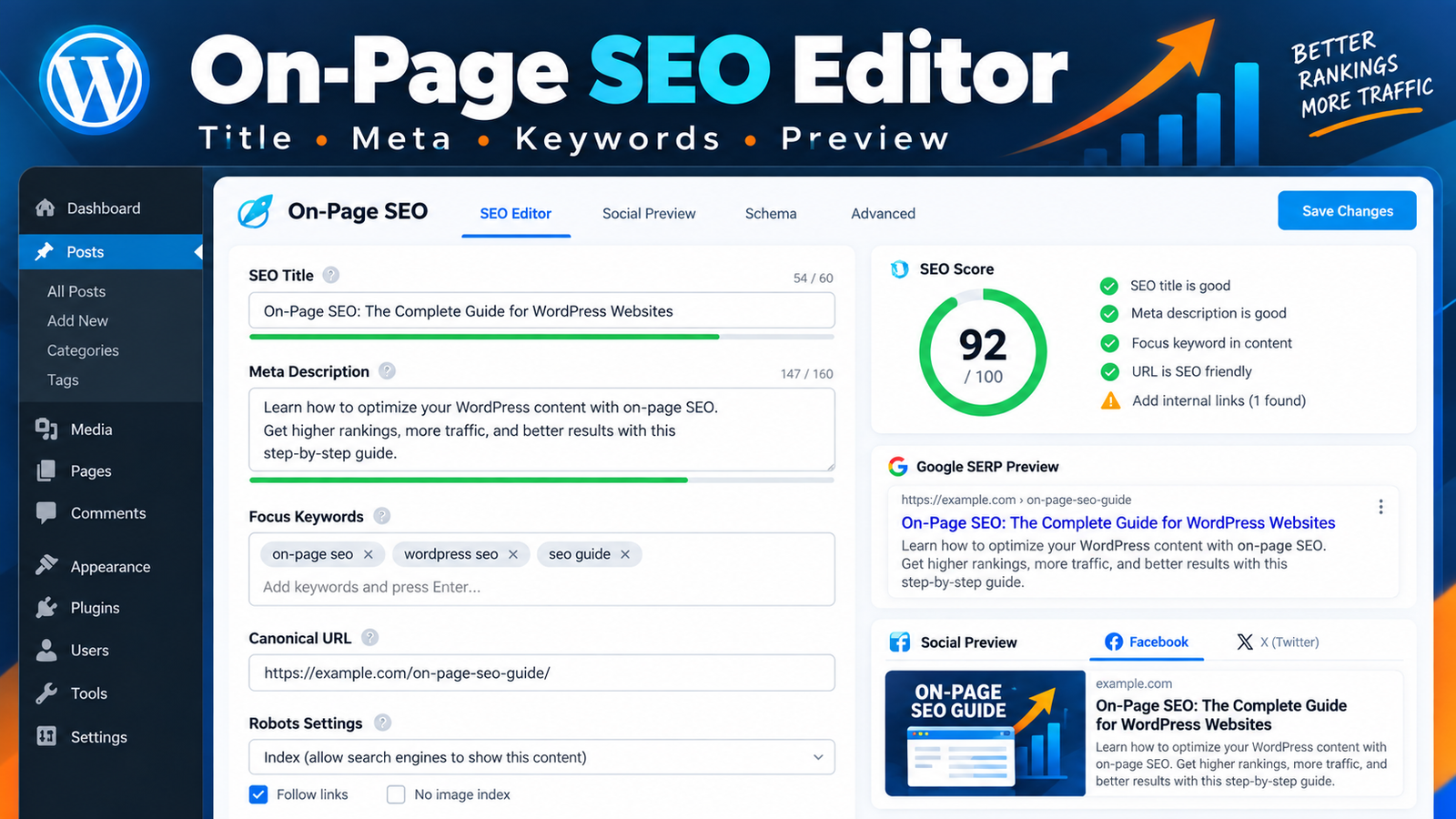
Editor में General, Advanced, Schema, Social और Analysis tabs हैं। Focus keyphrases unlimited comma-separated हो सकती हैं; primary-keyword analysis Hindi/English phrase coverage को भी handle करता है।
Focus keyphrases, SEO title/meta, canonical, robots, social preview और analysis को editor में manage करें।
Title & Meta: SEO title/description manually set करें या safe templates/auto-fill missing fields use करें।
Canonical & Robots: index/noindex, nofollow, noarchive, nosnippet और noimageindex controls available हैं।
Preview: live search preview और Open Graph/X social preview से appearance check करें।
Score: On-page, Technical, Links और Media/Social breakdown को recommendation मानें, ranking guarantee नहीं।
5Google Search Console, URL Inspection और PageSpeed
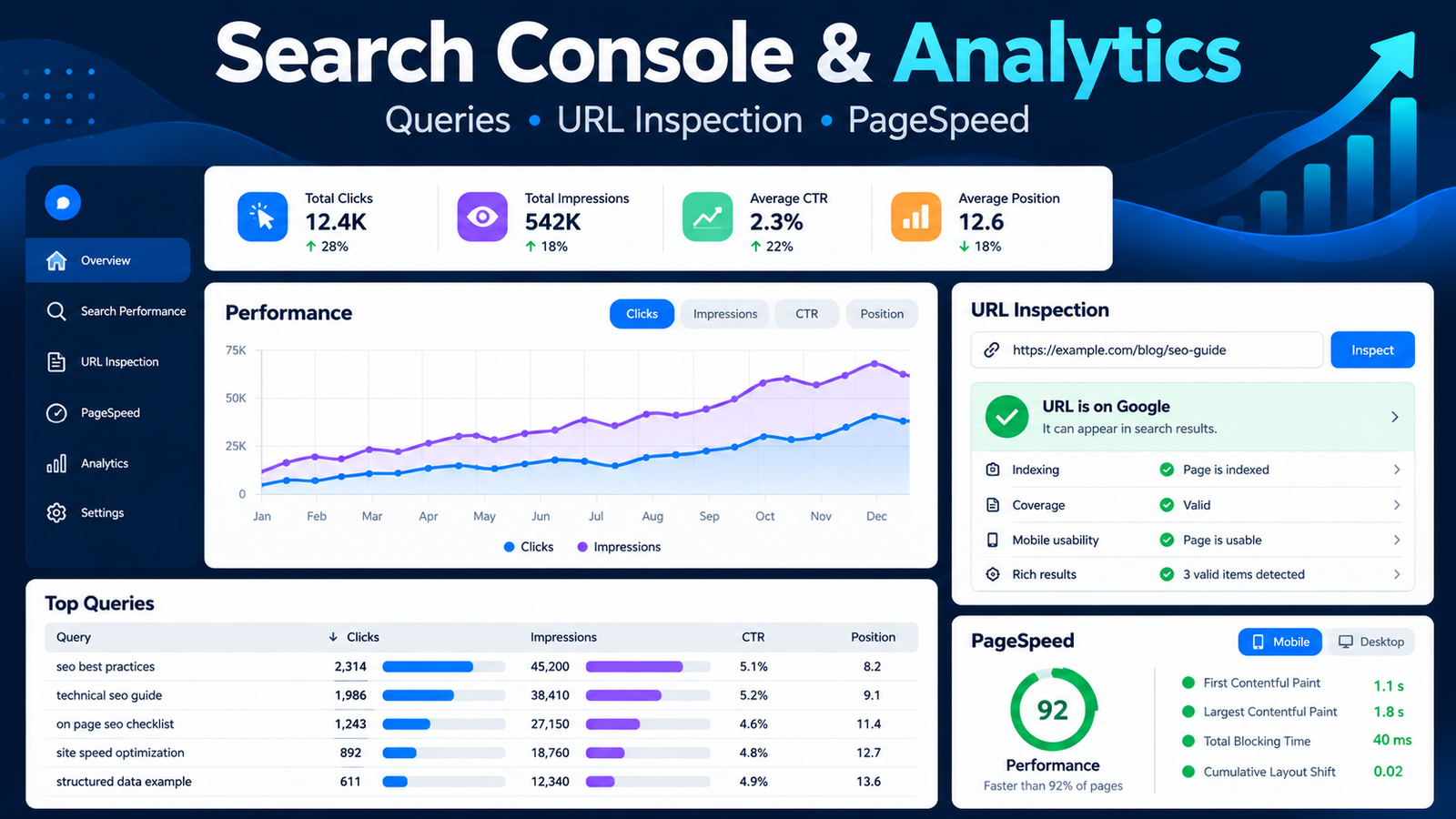
OAuth workspace Search Console से clicks, impressions, CTR, average position, top queries/pages और URL Inspection data ला सकता है। PageSpeed workspace performance, SEO, accessibility और best-practices metrics दिखाता है।
Search Console workspace, URL Inspection, query/page data और PageSpeed metrics को diagnostics के लिए use करें।
Search Console: अपनी site/property और OAuth credentials correctly configure करें।
URL Inspection: indexed/not indexed state को diagnosis के लिए use करें; plugin indexing guarantee नहीं कर सकता।
Rank History: daily query-position snapshots historical visibility देते हैं।
PageSpeed: LCP/INP/CLS/TBT जैसे available metrics को bottleneck analysis के लिए देखें।
6Site Audit, Duplicate Checker और Internal Links
Site-wide audit duplicate metadata, thin content, multiple H1, indexability, canonical issues, HTTPS, image ALT gaps, orphan content और unresolved internal links जैसी problems detect कर सकता है।
Site Audit, Duplicate Checker, internal-link guidance और Smart Intelligence से issues को review और prioritize करें।
Duplicate Checker: titles, SEO titles, descriptions, canonicals, focus keywords, near-duplicate content और WooCommerce SKU/GTIN duplicates check करता है।
Internal Link Assistant: related-content suggestions और copy-link HTML देता है; links automatically insert नहीं करता।
External Link Checker: छोटे background batches में external links process करता है।
Rendered HTML Validator: final public HTML fetch करके actual title/meta/canonical/H1/robots/JSON-LD output check करता है।
7Schema Studio Pro + WooCommerce Merchant SEO
Schema Studio reusable JSON-LD templates, smart variables, per-post selection और post-type auto-apply rules देता है। WooCommerce SEO Pro merchant-readiness और product data consistency पर focus करता है।
Schema Studio reusable JSON-LD templates देता है; WooCommerce tools merchant fields, feed और product-readiness checks में मदद करते हैं।
Template Tools: duplicate/edit/delete, live JSON validation और admin-only custom JSON-LD support।
WooCommerce: brand, GTIN, MPN, SKU enrichment और safe product social cards।
Merchant Feed: variations, item_group_id, real URLs, prices, availability, images, attributes और shipping weight को real data होने पर export कर सकता है।
Policies: MerchantReturnPolicy/ShippingService output केवल real customer-visible policies होने पर enable करें।
8XML Sitemaps, News/Video/Author Sitemap और IndexNow
SEO Master sitemap index post/page/product/taxonomy sitemaps, featured/content images और optional News, Video तथा author sitemaps support करता है।
Sitemap Index: paginated sitemap files large sites को manageable रखते हैं।
Google News: recent eligible posts के लिए optional news sitemap।
robots.txt: sitemap declaration जोड़ सकता है।
IndexNow: Bing और participating engines को supported URL update notifications भेज सकता है।
Verification: Search Console/Bing/Pinterest verification meta भी available है।
9Redirect Manager और 404 Monitor
Internal redirect manager 301/302/307/308 rules, optional regex, slug-change 301, hit counters और CSV import/export support करता है। 404 Monitor bot/noise filtering के साथ human-focused reports देता है।
Exact Redirects: simple URL changes पर exact rules prefer करें।
Regex: advanced users ही test करके enable करें।
Chain Collapse: simple exact redirect chains को reduce करने में मदद कर सकता है।
404 Suggestions: likely-destination suggestions human review के लिए हैं; auto redirect blindly न करें।
10SEO Intelligence Control Center
Smart Intelligence safe auto-fixes, content decay, publish gate, orphan rescue, merchant validation, frontend conflict scanning और rollback-oriented workflows को एक जगह लाता है।
Publish Gate: warnings देता है; optional Strict mode केवल clear critical states जैसे empty title या explicit noindex पर block कर सकता है।
Content Decay: दो 28-day Search Console periods compare करके meaningful click/position declines flag करता है।
Orphan Rescue: likely source pages suggest करता है; content में link खुद insert नहीं करता।
Frontend Conflict Scanner: real same-site URLs fetch करके duplicate title/meta/canonical/Open Graph/robots output detect करता है।
Change History: tracked SEO field changes rollback के लिए dedicated history table में रखता है।
11Migration और Other SEO Plugins के साथ Compatibility
Yoast SEO और Rank Math metadata fallback/migration supported हैं। Duplicate-output protection Yoast, Rank Math या AIOSEO active होने पर conflicting frontend SEO output से बचने के लिए designed है।
Dry Run: migration शुरू करने से पहले source scope और existing target estimate देखें।
Large Site: v2.4.0 migration 200-record resumable batches और cursor checkpoints use करता है।
Resume: interrupted migration WP-Cron से resume हो सकती है और existing IndiaTVDNA fields preserve करती है।
Verify: migration के बाद actual frontend output और sample URLs check करें।
12Security, Stability और Large-Site Production
Recent production builds credential security, updater rollback, request-aware module loading, multisite batching और recovery diagnostics पर focus करते हैं।
Credential Vault: GSC Client Secret, PageSpeed API key और Bing API key encrypted-at-rest storage use करते हैं।
Updater: staged replacement, integrity checks, previous-code rollback slot और post-update smoke verification शामिल हैं।
Feature Integrity: visible controls को real callbacks/routes/hooks/tables/rewrites से verify करता है; Safe Repair non-destructive है।
Deep Live Self-Test: real HTTP-rendered title/meta/canonical/social/schema output verify करने में मदद करता है।
Performance Guard: plugin DB table health और non-destructive schema repair check कर सकता है।
13कैसे Verify करें कि SEO Setup सच में सही है?
Dashboard score या green toggle alone proof नहीं है। Final public output, sitemaps, robots, schema और search-platform data को separately verify करें।
Frontend Source: title, meta description, canonical, robots और Open Graph tags inspect करें।
Sitemap: sitemap index तथा child sitemaps HTTP 200 और valid XML होने चाहिए।
Search Console: property, sitemap status और URL Inspection data cross-check करें।
Feature Integrity: visible module और action wiring का audit run करें।
14Common Problems और Safe Fixes
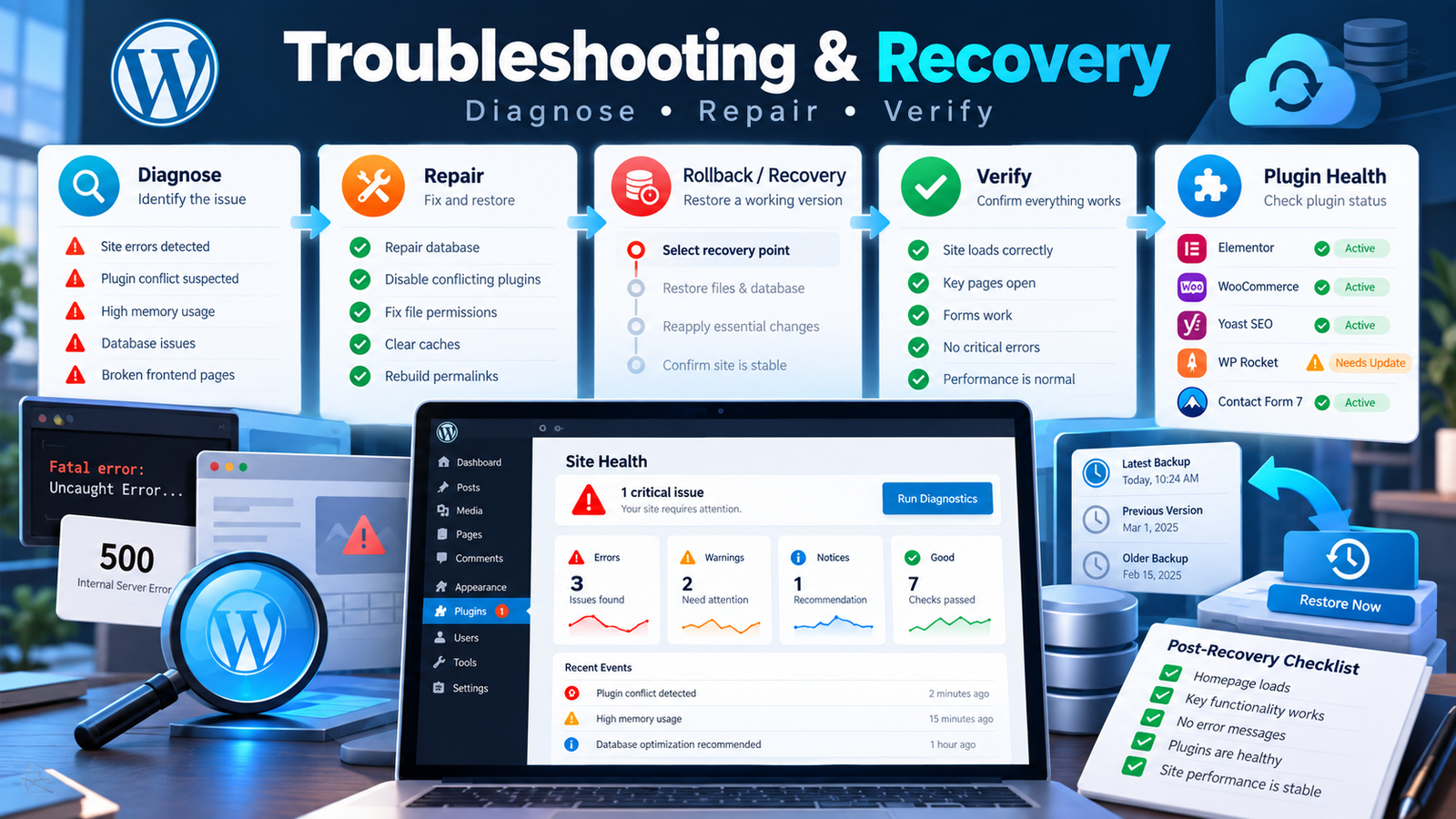
SEO plugins में common problems duplicate output, stale migrations, OAuth/API credential issues, sitemap rewrite/cache conflicts और merchant data inconsistency से आते हैं।
Feature Integrity, rendered-output checks, recovery diagnostics और rollback tools से changes को safely verify करें।
Duplicate SEO Tags: एक ही frontend SEO provider active रखें; conflict scanner/duplicate-output protection check करें।
Sitemap 404: permalinks refresh, cache/CDN purge और rewrite health check करें।
Schema Warning: real content/merchant fields missing हों तो fake values add न करें; source data ठीक करें।
Migration Interrupted: resumable state/progress check करें; existing IndiaTVDNA data overwrite न करें।
Update Issue: Stability/Health, Feature Integrity और post-update verification/rollback state inspect करें।
Best Practices
Auto Best Setup apply करने से पहले detected site profile confirm करें।
Focus keyword score को guide समझें; search intent, content quality और factual accuracy को priority दें।
Schema में केवल वही business/product/policy data output करें जो real page/site पर सच में मौजूद है।
Search Console, PageSpeed और Merchant data को diagnostics के लिए use करें; ranking/traffic की guarantee न मानें।
Redirects या migrations से पहले backup/snapshot रखें और sample URLs पर frontend test करें।
Large sites पर background queue/batched tools को complete होने दें; repeated manual runs avoid करें।
Quick FAQ
Q. क्या SEO Master Google ranking guarantee करता है?
A. नहीं। Plugin technical/on-page SEO को manage और diagnose करने में मदद करता है; rankings content, competition, authority, crawl/indexing और many external factors पर depend करती हैं।
Q. क्या Rank Math या Yoast से migration कर सकता हूँ?
A. हाँ, safe fallback/migration tools available हैं; पहले dry run/backup करें और migrated output verify करें।
Q. क्या Search Console connect करना जरूरी है?
A. Core SEO के लिए जरूरी नहीं, लेकिन query/page data, URL Inspection, rank-history और decay detection के लिए useful है।
Q. क्या WooCommerce merchant feed fake missing fields बना देता है?
A. Feed और validators real stored product/variation data use करने के लिए designed हैं; missing data को source product में सही करें।
Q. क्या सभी schema एक साथ enable करने चाहिए?
A. नहीं। Content type और page purpose के हिसाब से relevant schema चुनें और duplicate/conflicting output से बचें।
Q. Lite और Full में क्या difference है?
A. Feature availability installed build के अनुसार बदलती है। Lite core/free tools देता है; Full build advanced Search Console, audit, intelligence, merchant, migration, recovery और production tooling जोड़ सकता है।
INDIATVDNA SEO MASTER PRO
Latest Version, Full Features और Support
SEO Master Pro के latest release, documentation, Full version और support के लिए IndiaTVDNA की official website देखें।


Leave a Reply