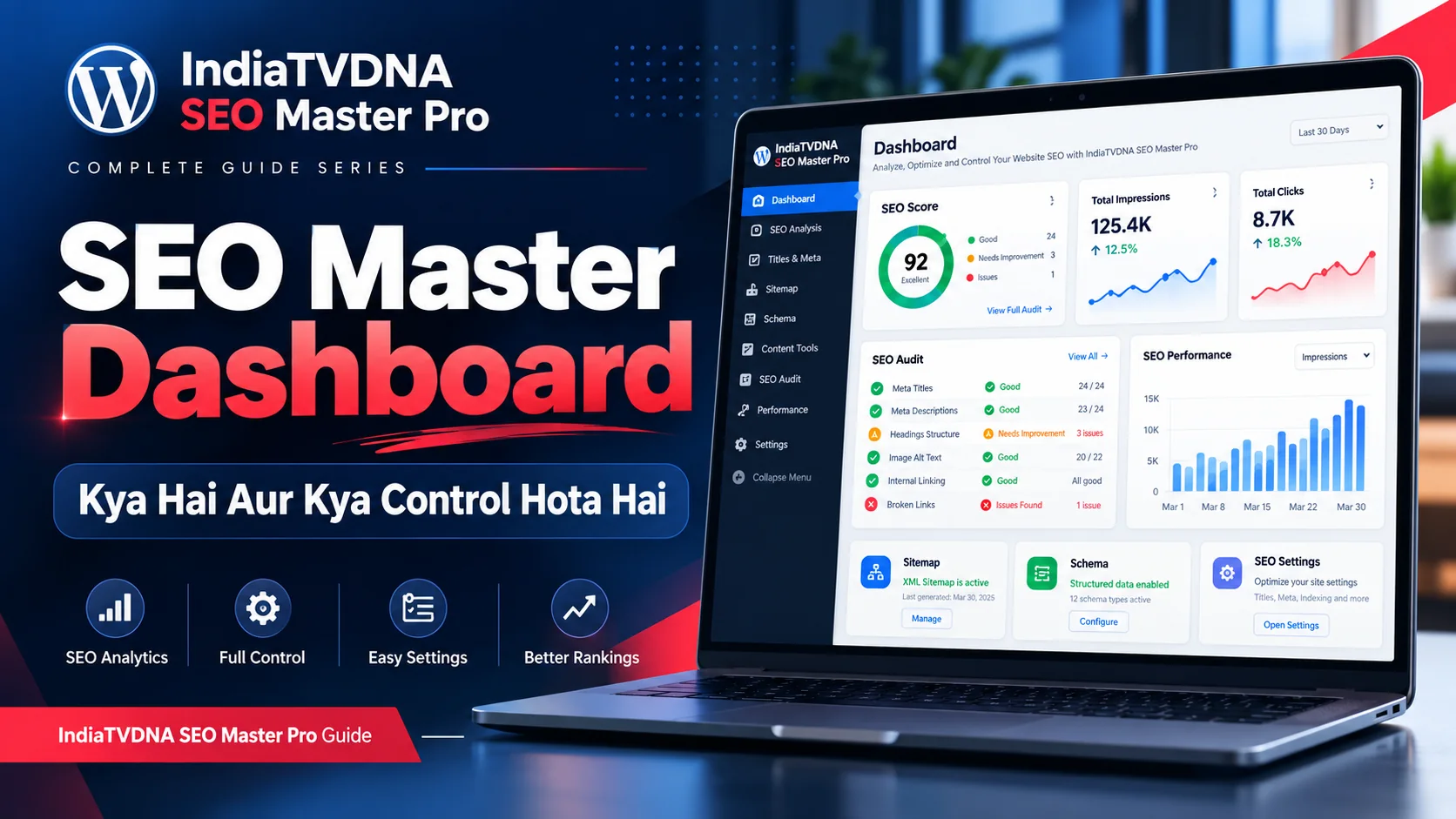
IndiaTVDNA SEO Master Pro Dashboard की पूरी Hindi guide: SEO score, audit issues, traffic summary, Search Console data, health cards, reports और सही priority में SEO work कैसे समझें।
SEO Master Pro का Dashboard सिर्फ numbers दिखाने वाला page नहीं है। सही तरीके से इस्तेमाल करने पर यह website की SEO स्थिति का control center बनता है: कहाँ problem है, किस issue को पहले fix करना है, कौन-सी setting active है और search performance में क्या बदल रहा है—इन सबका overview एक जगह मिलता है।
इस guide में Dashboard के हर मुख्य हिस्से को practical तरीके से समझाया गया है ताकि आप केवल green score देखकर संतुष्ट न हों, बल्कि उस score के पीछे की वास्तविक स्थिति, frontend output और Search Console data भी verify कर सकें।
1. Dashboard का असली काम क्या है?
Dashboard अलग-अलग SEO modules की information को readable summary में लाता है। Titles & Meta, XML Sitemap, Schema, Audit, Search Analytics और technical checks अलग-अलग जगह काम करते हैं, लेकिन Dashboard आपको बताता है कि attention कहाँ चाहिए। इसे ranking report नहीं, diagnosis और workflow planning tool समझें।
- SEO health का high-level overview देखें।
- Critical, warning और improvement items अलग करें।
- Traffic/visibility data available हो तो trend देखें, single-day number नहीं।
- जिस feature पर issue दिखे, उसी module में detailed check करें।
2. SEO Score को सही तरीके से कैसे समझें
SEO Score useful summary हो सकता है, लेकिन 100 score आपका अंतिम लक्ष्य नहीं होना चाहिए। Missing title, description, headings, image ALT, broken links, indexability या technical configuration जैसी actionable चीजें जल्दी पहचानना score का असली फायदा है। Score बढ़ने के बाद भी public page output verify करना जरूरी है।
- Critical issue पहले fix करें, cosmetic recommendation बाद में।
- Score बढ़ना ranking guarantee नहीं है।
- Site type के अनुसार कुछ checks लागू नहीं भी हो सकते।
- Fix के बाद title, canonical, robots, schema और sitemap verify करें।
3. Traffic, Impressions, CTR और Clicks cards क्या बताते हैं?
अगर Search Console integration connected है, Dashboard clicks, impressions, CTR या average position जैसी metrics दिखा सकता है। Impressions बढ़ें लेकिन clicks न बढ़ें तो title/meta, search intent और average position investigate करें। एक-दो दिन का fluctuation normal है; comparable periods देखना ज्यादा useful है।
- Clicks = search result से site visits का संकेत।
- Impressions = result कितनी बार दिखा।
- CTR = impressions में से clicks का ratio।
- Average position को aggregated indicator समझें, exact fixed rank नहीं।
4. SEO Audit summary से क्या पता चलता है?
Audit area missing metadata, broken links, multiple H1, image ALT gaps, canonical conflicts, noindex pages, duplicate titles या thin content जैसी समस्याओं की दिशा देता है। Dashboard summary entry point है; actual URL list और evidence Audit module में देखें।
- Error की URL list खोलें।
- Intentional configuration और वास्तविक error में फर्क करें।
- Bulk change से पहले backup रखें।
- Fix के बाद audit दोबारा चलाकर compare करें।
5. Dashboard cards से सही module में कैसे जाएँ
Best workflow problem-driven होना चाहिए। Sitemap warning पर Sitemap module, schema warning पर Schema, metadata issue पर Titles & Meta या on-page editor, traffic decline पर Search Analytics/Search Console और broken URLs पर Audit/404/Redirect tools खोलें।
- Metadata → Titles & Meta / On-page editor।
- Sitemap → XML Sitemap।
- Structured data → Schema।
- Traffic trend → Search Analytics।
- Broken/crawl issue → Audit, 404, Redirect।
6. Priority कैसे तय करें: पहले क्या fix करें?
सबसे पहले crawl, indexing, canonicalization या access रोकने वाले issues fix करें। उसके बाद duplicate/conflicting output, important page metadata, internal linking और optional enhancements करें।
- Accidental noindex/robots block highest priority।
- Redirect loop या wrong canonical तुरंत देखें।
- Important landing/product pages की metadata बाद में optimize करें।
- Low-impact cosmetic suggestions को last में रखें।
7. Blog, Business और WooCommerce site में Dashboard का use
Blog में content coverage, indexing, internal links और traffic trend महत्वपूर्ण हैं। Business site में homepage/service pages, organization/local details और lead pages पर focus करें। WooCommerce store में product metadata, Product schema, merchant fields, categories और duplicate product URLs ज्यादा महत्वपूर्ण हो सकते हैं।
- Blog: posts, categories, internal links, archive strategy।
- Business: services, organization/local data, contact consistency।
- WooCommerce: products, variations, SKU/GTIN, Product schema, merchant readiness।
8. Dashboard के मुख्य फायदे
Dashboard time saving, prioritization और regression detection में मदद करता है। Weekly routine में वही health indicators देखने से update, migration या content changes के बाद unexpected SEO problems जल्दी पकड़ में आ सकती हैं।
- SEO work priority में रहता है।
- Major issues जल्दी दिखते हैं।
- Search data और technical health एक workflow में जुड़ते हैं।
- Updates के बाद regression detect करना आसान होता है।
9. Common mistakes जिन्हें avoid करना चाहिए
सबसे common mistake score chasing है—सिर्फ score बढ़ाने के लिए unnecessary keywords, headings या schema जोड़ देना। दूसरी mistake हर warning को error मान लेना और तीसरी frontend verification न करना है।
- 100 score को ranking guarantee न मानें।
- Bulk fixes blindly apply न करें।
- Duplicate SEO plugin output active न छोड़ें।
- Dashboard result को frontend source से cross-check करें।
10. Final Dashboard Verification Checklist
Dashboard review के बाद नीचे के checks करें ताकि overview verified SEO state में बदल जाए।
- Homepage और 2-3 important URLs का title/meta/canonical source में verify करें।
- robots.txt और XML sitemap HTTP 200 check करें।
- Schema वाले page को validator में test करें।
- Search Console property और sitemap status verify करें।
- Critical audit error की actual URL manually test करें।
Frequently Asked Questions
नहीं। Score guidance है। सही indexing, useful content, clean technical output और search intent ज्यादा महत्वपूर्ण हैं।
Search Console integration, property access, date range और data availability check करें। नई site पर data आने में समय लग सकता है।
कुछ assisted tools हो सकते हैं, लेकिन important changes को review और verify करना चाहिए।
- IndiaTVDNA SEO Master Pro Dashboard कैसे Use करें? Daily/Weekly SEO Workflow और Step-by-Step Practical Guide
- IndiaTVDNA SEO Master Pro Quick Setup क्या करता है? Auto Best Setup, Safe Defaults और Beginners के लिए Full Guide
- IndiaTVDNA SEO Master Pro Titles & Meta क्या है? SEO Title, Meta Description, Snippet और CTR की Complete Guide
Leave a Reply