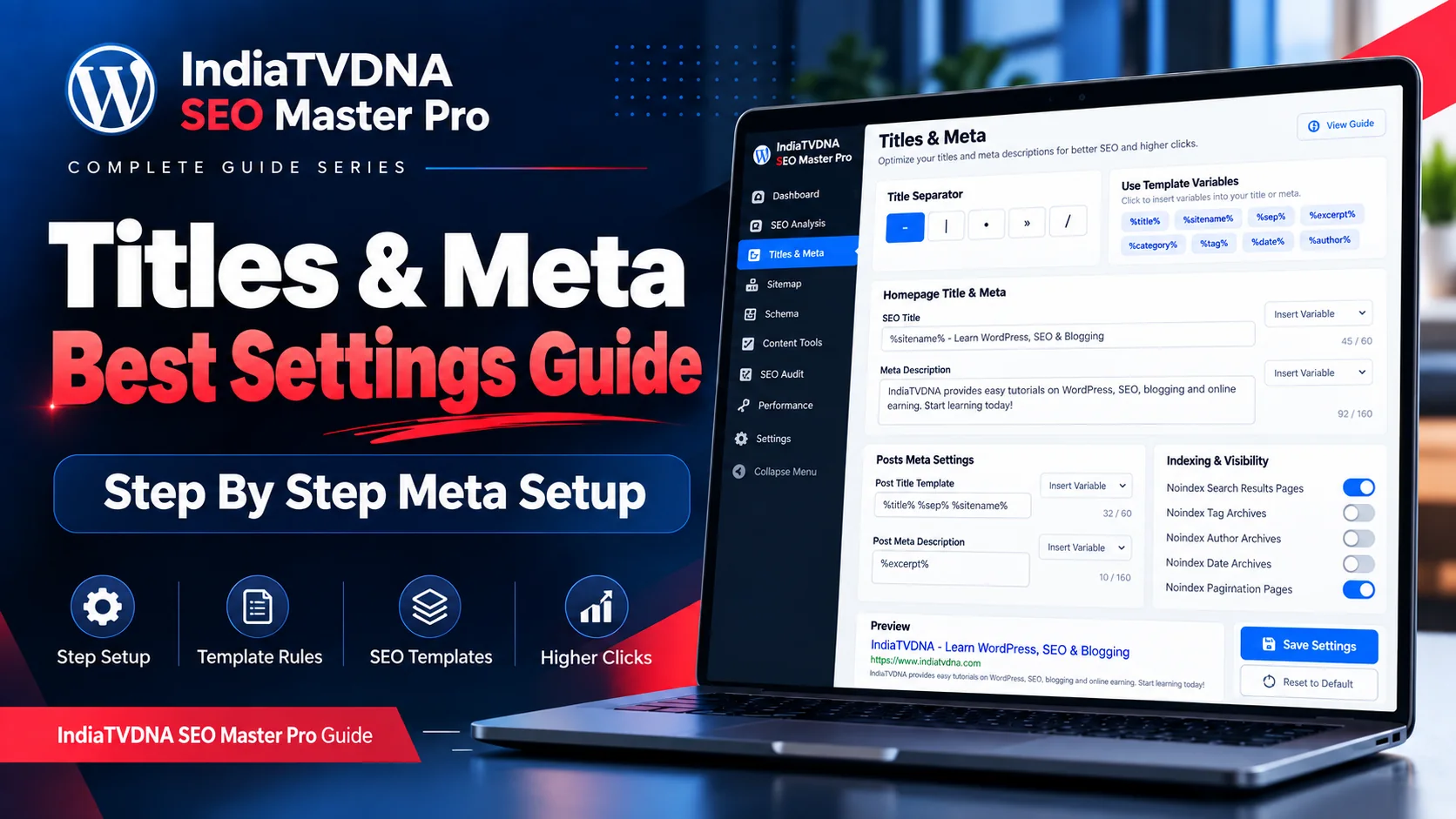
Titles & Meta module की step-by-step Hindi setup guide: title separator, homepage SEO, post/page/product templates, variables, archive noindex strategy, preview और troubleshooting।
यह guide Titles & Meta module को production-friendly तरीके से configure करने के लिए है। Goal है: sensible defaults + important pages पर manual control + duplicate output से बचाव।
Settings save करने से पहले existing titles और search performance का baseline note करना useful है, खासकर बड़ी site पर।
1. Title Separator चुनें
Separator branding/readability के लिए cosmetic choice है—dash, pipe या bullet जैसे options common हैं। एक consistent separator चुनें और बार-बार बदलने की जरूरत नहीं। Separator खुद ranking factor नहीं है।
- Simple separator रखें।
- Brand name duplicate न हो।
- Template preview देखें।
2. Homepage Title setup
Homepage title में brand और main offering/topic स्पष्ट रखें। Local business हो तो location natural तरीके से include हो सकती है। Title इतना generic न हो कि user को site purpose समझ न आए।
- Brand + primary purpose।
- Unnecessary keyword list avoid।
- Static homepage हो तो page-specific override check।
3. Homepage Meta Description
Description में site किसके लिए है, क्या value देती है और user को क्या मिलेगा—यह concise तरीके से बताएं। Contact number, price या offer तभी लिखें जब stable/accurate हो।
- Unique summary।
- Primary benefit।
- Natural CTA optional।
- Misleading promise नहीं।
4. Blog Post title template
Blog posts के लिए default template सामान्यतः post title + site name पर्याप्त है। अगर title पहले से brand include करता है तो duplicate brand suffix न जोड़ें। Important evergreen posts पर custom SEO title test किया जा सकता है।
- %title% + separator + %sitename% pattern useful।
- Current year variable केवल yearly content में।
- Category variable तभी जब readable output बने।
5. Pages title/meta template
Pages अक्सर services, about, contact या landing pages होते हैं। Generic template से ज्यादा manual metadata useful हो सकती है। Service page में service + location/benefit relevant हो सकता है, लेकिन doorway-style repetitive titles avoid करें।
- Core pages manually optimize करें।
- Contact/About unique titles।
- Location pages unique content के साथ।
6. WooCommerce Product settings
Product title में product name सबसे important है। Brand/model/size जैसे attributes तभी add करें जब user search intent और readability में मदद करें। Meta description में real product benefit/USP हो; fake discount या unavailable stock claim न लिखें।
- Product name clear।
- Brand/model where useful।
- Variation duplication check।
- Product schema data logically consistent रखें।
7. Categories, Tags, Author और Date archives
Useful category pages के लिए descriptive title/meta और introductory content अच्छा है। Tags बहुत thin हों तो indexability review करें। Single-author blog में author archive main blog listing जैसा duplicate हो सकता है; multi-author publication में useful हो सकता है।
- Curated categories index।
- Thin tags noindex consider।
- Single-author author archive review।
- Internal search results often noindex।
8. Template Variables safely use करें
Variables powerful हैं लेकिन output sample check करना जरूरी है। Empty category/author value या duplicate site name unexpected titles बना सकता है। Template save करने से पहले preview और 3-5 live content types sample करें।
- Empty variable fallback देखें।
- Brand duplication check।
- Special characters rendering check।
9. Per-post override workflow
High-value pages पर editor में SEO title, description, canonical और social preview manually review करें। Global template बाकी long-tail content के लिए fallback रहे।
- Homepage।
- Top landing pages।
- Top products।
- High-impression posts।
10. Save के बाद frontend test और troubleshooting
Cache clear करें और incognito में page खोलें। View source में एक title tag, एक meta description और correct canonical देखें। Duplicate output मिले तो दूसरा SEO plugin, theme SEO function या custom code investigate करें। Google पुराना/अलग snippet दिखा सकता है; plugin output और search result अलग concepts हैं।
- Title single।
- Description single।
- Canonical single/correct।
- Social tags duplicate नहीं।
- Search Console recrawl signals later check करें।
Frequently Asked Questions
Fixed character rule नहीं; concise descriptive title रखें और preview में truncation/readability देखें।
High-value products manually बेहतर हैं; बाकी के लिए sensible template/fallback use किया जा सकता है।
Google query और page content के आधार पर अलग snippet चुन सकता है; यह normal behavior है।
- IndiaTVDNA SEO Master Pro Titles & Meta क्या है? SEO Title, Meta Description, Snippet और CTR की Complete Guide
- IndiaTVDNA SEO Master Pro XML Sitemap क्या है और SEO में क्यों जरूरी है? Crawling, Discovery और Indexing Full Guide
- IndiaTVDNA SEO Master Pro Schema Setup कैसे करें? Article, Product, FAQ, Breadcrumb और Rich Results Step-by-Step
Leave a Reply